A hauling office's phone never stops: customers asking where their load is, drivers asking about work, carriers asking about an invoice, vendors, sales calls, wrong numbers. The people who answer it are usually the same people who should be dispatching trucks — and half the callers speak Spanish.
When we built Carry Ops with Avensis Energy, a Houston-area aggregator using technology to take friction out of its day, the front desk was one of the first places they wanted relief. The goal wasn't to replace the people in the office. It was to stop the phone from running their morning.
Know why people are calling
Before you automate anything, sort the calls. In a hauling office they tend to fall into a short list:
- Delivery status — "Did my load arrive?" "When's the truck coming?"
- Dispatch — carriers and drivers who need a person now.
- Billing — invoice questions, payment status.
- New business — a contractor or customer asking about hauling.
- Drivers asking about work.
- Vendors, sales calls and wrong numbers.
Most of those don't need a dispatcher. Some of them absolutely do.
Decide what the front desk is allowed to do
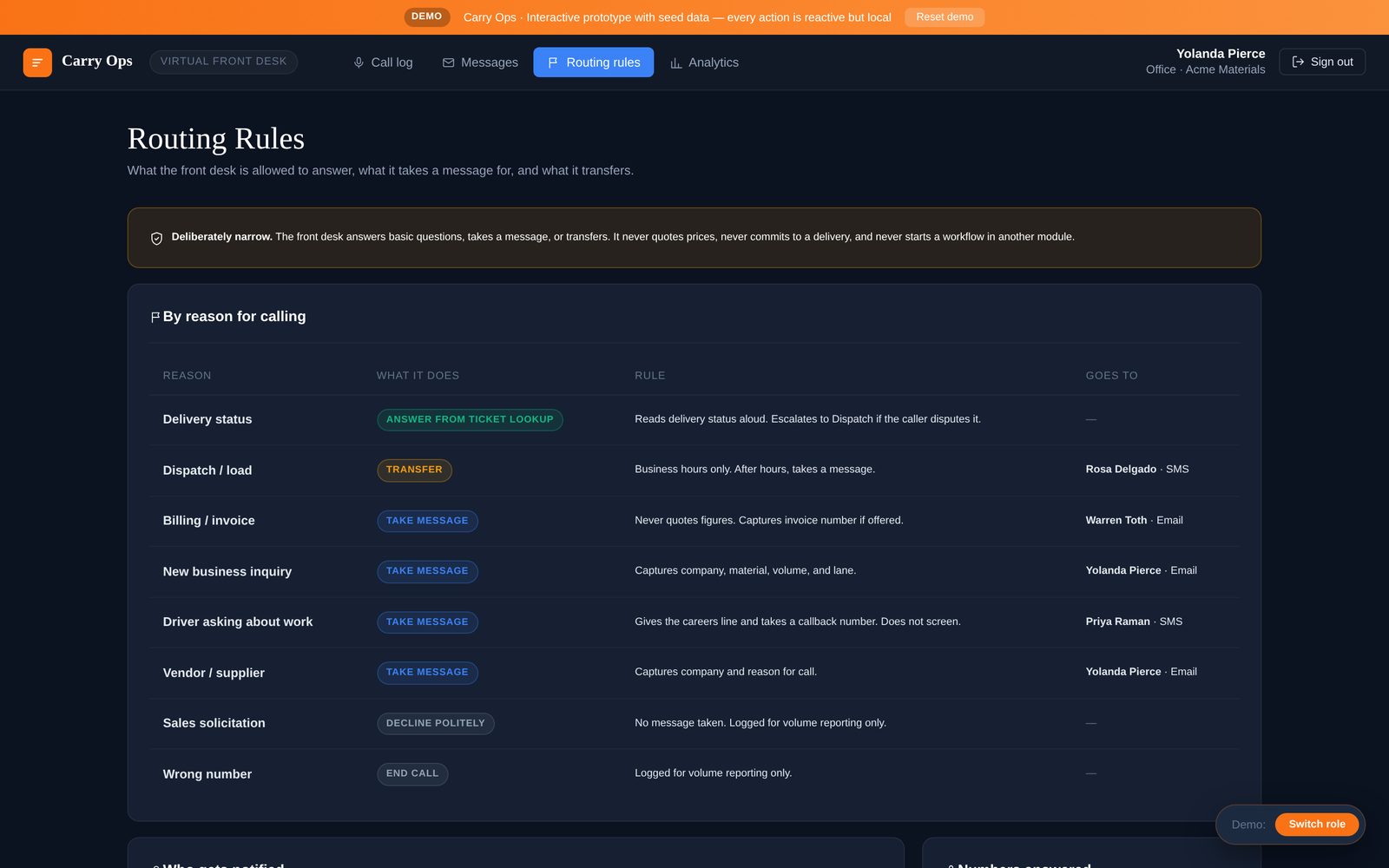
The mistake with AI receptionists is letting them do too much. The safest design is deliberately narrow: for each reason someone calls, the front desk does exactly one of three things — answer, take a message, or transfer.
- Delivery status: answer, by reading it straight from the ticket record. If the caller disputes it, escalate to dispatch.
- Dispatch: transfer during business hours; after hours, take a message.
- Billing: take a message. Never quote figures. Capture the invoice number if they have it.
- New business: take a message with company, material, volume and lane, so sales calls back prepared.
- Drivers asking about work: give the careers line and take a callback number.
- Sales calls and wrong numbers: decline politely and log them.
Write those rules down where your team can see and change them. Nothing should happen on a call that isn't on that list — no promises, no prices, no commitments to a delivery.
Messages that reach the right person
A message nobody owns is a voicemail with extra steps. Every message should go, by email or text, to whoever owns that topic: billing to billing, new business to whoever sells, driver inquiries to recruiting. The message should say who called, why, and what they need — so the callback takes two minutes, not ten.
English and Spanish on every call
Drivers, carriers and site crews call in both languages. A front desk that answers in English and Spanish, and switches with the caller, is one of the simplest ways to stop losing calls — and good will — on the first ring.
Measure what never reached your team
Track call volume, what people called about, and how many calls were fully handled without a person picking up. That number is the time you got back, and the reasons list tells you what else is worth fixing — if half your calls are delivery status, your customers can't see their loads.
How this works in Carry Ops
The Virtual Front Desk in Carry Ops answers your main line in English and Spanish. It reads delivery status from the ticket record, transfers dispatch calls during business hours, and takes messages for billing (never quoting figures), new business, driver inquiries and vendors — each sent by email or text to the person who owns that topic. Routing rules for every reason to call are on one screen you control, and the call log and analytics show what the front desk handled without your team.